
Problems We Face in Day-to-Day Development
- When we need to hotfix a production bug, how should we branch? Do we change
developormasterdirectly? - We often have multiple parallel features with different release dates, owned by different sub-teams. Managing these parallel tracks and shipping the correct code is hard.
- Everyone names branches differently, and interpretations vary. Right before release we discover the wrong branches were merged.
Goals of Branch Management
- Commit code to the branch where it belongs.
- Be able to switch to the stable production code at any time.
- Develop multiple versions in parallel.
- Make the purpose of each branch clear and ensure operations match that purpose.
- Use Git to manage iterations, hotfixes, and feature development.
A Reference From a Predecessor
A successful Git branching model
By Vincent Driessen on Tuesday, January 05, 2010
A successful Git branching model
This is not official Git or GitHub documentation. It’s a personal summary based on that author’s team at the time, so it doesn’t map directly to our current workflow. After studying Git Flow, we defined our own team conventions.
Our Conventions
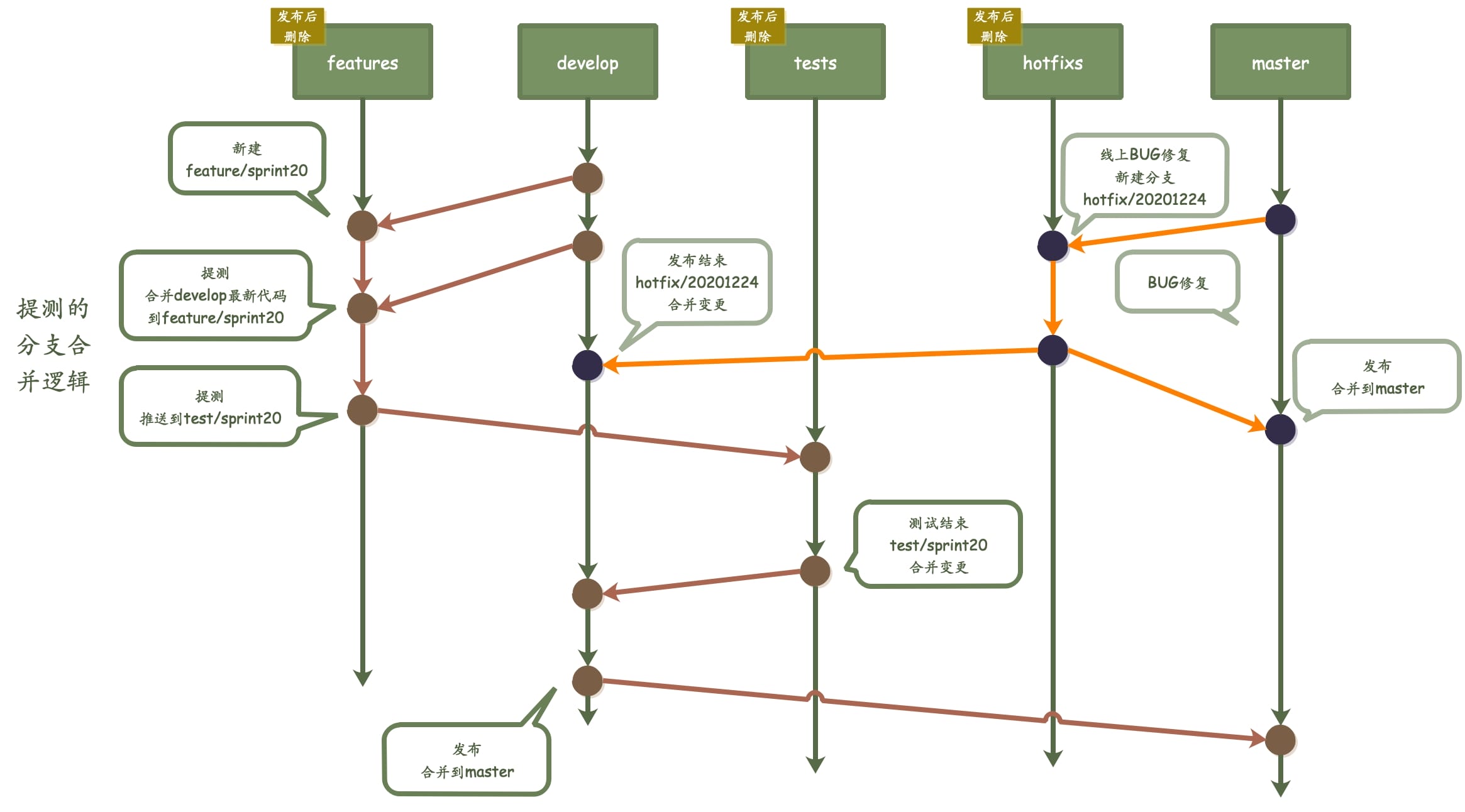
feature/sprintXX
- Purpose: new feature iteration development
- Environment: DEV
- Create: from
develop - Delete: after release
- Restriction: none
test/sprintXX
- Purpose: testing for new feature iterations
- Environment: FAT
- Create: from feature branch (before each test, merge
developintofeature, then mergefeatureintotest) - Delete: after release
- Restriction: No Push / developer merge
hotfix/yyyyMMdd
- Purpose: production issue fix
- Environment: FAT
- Create: from
master(after release, merge back tomasteranddevelop) - Delete: after release
- Restriction: none
develop
- Purpose: contains the latest feature code, base for
feature/sprintXX - Restriction: No Push / developer merge
master
- Purpose: stable code
- Environment: PROD
- Restriction: No Push / merge by limited maintainers
Branch Operations
Use rebase on feature/sprintXX branches
To keep a clean commit graph. git pull defaults to merge, so you can use rebase:
git pull --rebase

# also set a global config
git config --global pull.rebase true
git config --global branch.autoSetupRebase always
Use no-ff for merges
Fast-forward merges produce a straight line and hide the branch history. Using --no-ff makes feature branch merges explicit:
# Merge sprint01 into develop
git merge --no-ff feature/sprint01